Get in touch
Learn how to integrate a Monarch RPM Meter with Raspberry Pi and Node-RED for real-time RPM monitoring, dashboard visualization, MySQL logging, and predictive maintenance in Industry 4.0 environments.
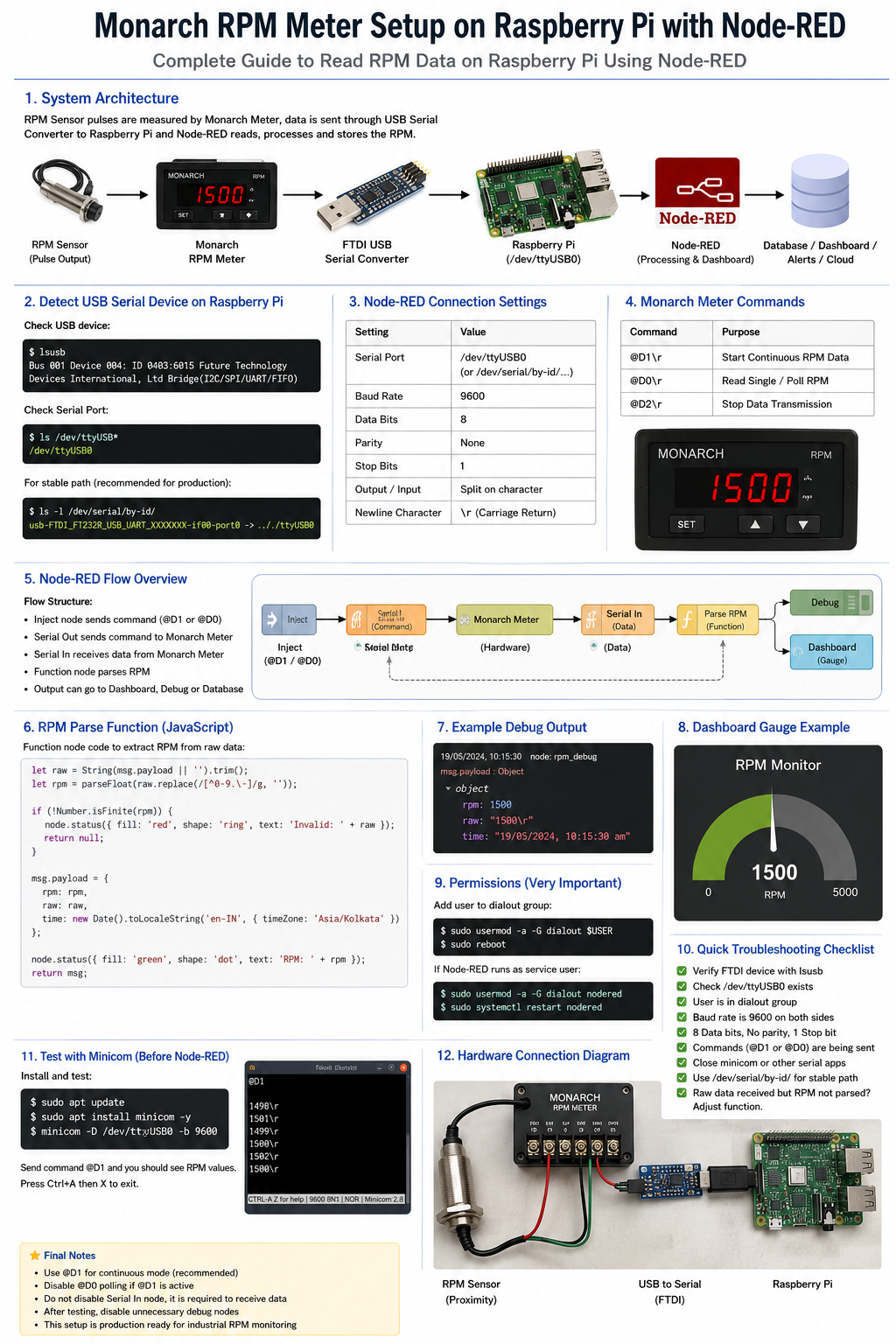
In modern manufacturing environments, machine performance monitoring is critical for improving productivity, reducing downtime, and enabling predictive maintenance. One of the most important parameters for rotating equipment is RPM (Revolutions Per Minute).
Traditionally, RPM values are displayed only on standalone meters, making historical analysis and remote monitoring difficult. To solve this challenge, we developed a low-cost Industrial IoT (IIoT) solution using a Monarch RPM Meter, Raspberry Pi, and Node-RED.
This article explains the complete architecture, implementation process, and business benefits of the solution.
Many manufacturing facilities rely on RPM meters installed directly on machines. While these devices provide accurate readings, they have several limitations:
As industries move toward Industry 4.0, there is a growing need to digitize machine data and make it available in real time.
We created a real-time RPM monitoring system that continuously collects RPM data from a Monarch RPM Meter and sends it to a centralized dashboard.
RPM Sensor → Monarch RPM Meter → FTDI USB Serial Converter → Raspberry Pi → Node-RED → MySQL Database → Dashboard
This architecture enables operators and managers to monitor machine performance from anywhere within the factory network.
The Monarch RPM Meter receives pulse signals from the sensor and calculates RPM values with high accuracy.
The FTDI converter establishes serial communication between the RPM meter and Raspberry Pi.
Acts as an edge computing device that receives RPM data and forwards it to Node-RED for processing.
Node-RED provides a visual programming environment for:
After connecting the FTDI converter, verify device detection:
lsusb
Check serial device:
ls /dev/ttyUSB*
Expected output:
/dev/ttyUSB0
For production deployments, using:
/dev/serial/by-id/
is recommended because the device path remains stable after reboots.
The Monarch RPM Meter communicates through standard serial settings:
| Parameter | Value |
|---|---|
| Baud Rate | 9600 |
| Data Bits | 8 |
| Parity | None |
| Stop Bits | 1 |
| Terminator | Carriage Return (\r) |
@D1\r
@D0\r
@D2\r
These commands allow complete control over the RPM meter communication process.
The final Node-RED flow consists of:
The Serial In node continuously receives RPM data while the Function node extracts numeric values and converts them into structured JSON.
Node-RED automatically converts raw serial data into:
{
  "rpm": 1450,
  "timestamp": "2026-05-29T10:15:00Z"
}
This structured format can be stored directly in MySQL or transmitted via MQTT.
Our dashboard includes:
Operators can instantly identify abnormalities and respond before failures occur.
Every RPM reading is stored in MySQL for:
Example table structure:
CREATE TABLE rpm_logs (
    id INT AUTO_INCREMENT PRIMARY KEY,
    machine VARCHAR(50),
    rpm FLOAT,
    created_at TIMESTAMP DEFAULT CURRENT_TIMESTAMP
);
By continuously monitoring RPM trends, maintenance teams can:
This reduces unplanned downtime and maintenance costs.
The system can be extended with:
Combining a Monarch RPM Meter, Raspberry Pi, and Node-RED creates a powerful Industrial IoT solution capable of real-time machine monitoring and predictive maintenance. The implementation is affordable, scalable, and perfectly aligned with Industry 4.0 initiatives.
Organizations looking to digitize shop-floor operations can use this architecture as a foundation for building advanced smart manufacturing systems.
Your email address will not be published. Required fields are marked *